Inventory Wash
Report Parameters
|
Field |
Description |
|---|---|
|
Report Name |
The name of the report. |
|
Start Date |
The start date from when the data must be considered for generating the report. |
|
End Date |
The end date until when the data must be considered for generating the report. |
|
Category |
A list of all available categories for report selection. |
|
Sub Category 1 |
Select the desired subcategory 1 from the drop-down list. |
|
Sub Category 2 |
Select the desired subcategory 2 from the drop-down list. |
|
Sub Category 3 |
Select the desired subcategory 3 from the drop-down list. |
|
Sub Category 4 |
Select the desired subcategory 4 from the drop-down list. |
|
Sub Category 5 |
Select the desired subcategory 5 from the drop-down list. |
|
Page Break |
Enables page break in the inventory wash report. |
Sample Report
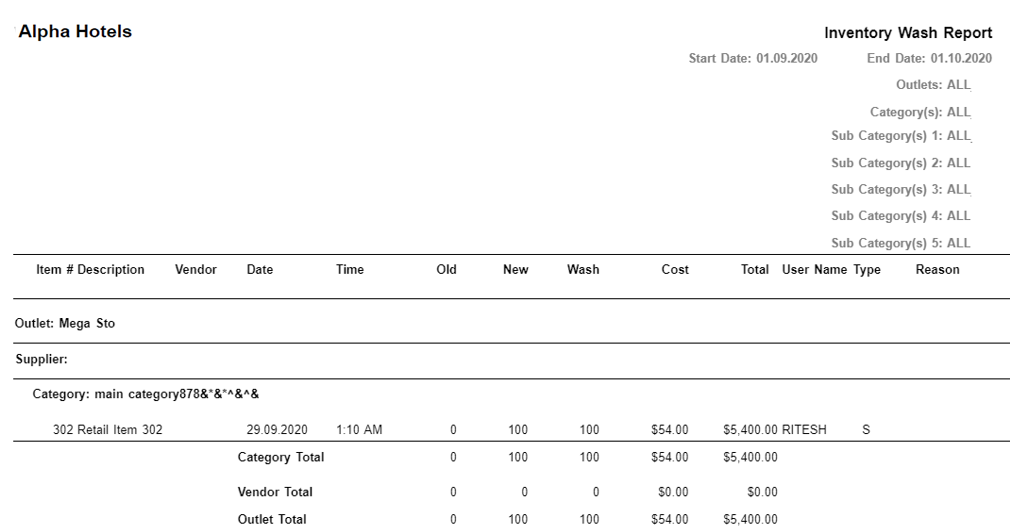
Report Fields
|
Field |
Description |
|---|---|
|
Item # |
Category number associated to the inventoried merchandise. |
|
Description |
The description of the item. |
|
Vendor |
The name of the vendor. |
|
Date |
The date the item was updated. |
|
Time |
The time when the item was updated by the user. |
|
Old |
The initial quantity on hand of the items. |
|
New |
The updated quantity of the items. |
|
Wash |
The difference between the initial quantity on hand and the updated quantity on hand of the items. |
|
Cost |
The unit cost of each item. |
|
Total |
The total cost of the items per wash. |
|
User Name |
The user ID of the user who updates the quantity on hand. |
|
Type |
The inventory types include the following:
|
|
Reason |
The reason entered by the user for inventory update. |
|
Category Total |
The total quantity and cost of items for each category. |
|
Vendor Total |
The total quantity and cost of items for each vendor. |
|
Outlet Total |
The total quantity and cost of all the items for an outlet. |